SDR Console, Beta Sept. 9th 2025
Simon Brown • September 9, 2025
Hello Again
I'm now back to 90% SDR Console support, so here's the first beta for at least eight months. Scroll to the bottom for a link to the beta kit.
The source is fully archived, so crash dumps can be analysed.
September 4th, 2025
- Added Simple-Radio-Control-Protocol (SRCP) as per JB's Dx Info and tested only with StationList.
SRCP specifies a method to control a radio and get its status back to StationList (or a similiar application). To avoid any headache on user and software writer a very simple method was chosen. Communication is done by sending UDP string messages.
- If there are other logging programs which support SRCP please let me know.
- I have not added support for RDS, only frequency changes.
- After the first message is sent from StationList the protocol is activated.
- This should be documented somewhere in the Settings somewhere, but where?
- What's missing?
August 30th, 2025
- If the RDS Database cannot be opened / created an error is now displayed.
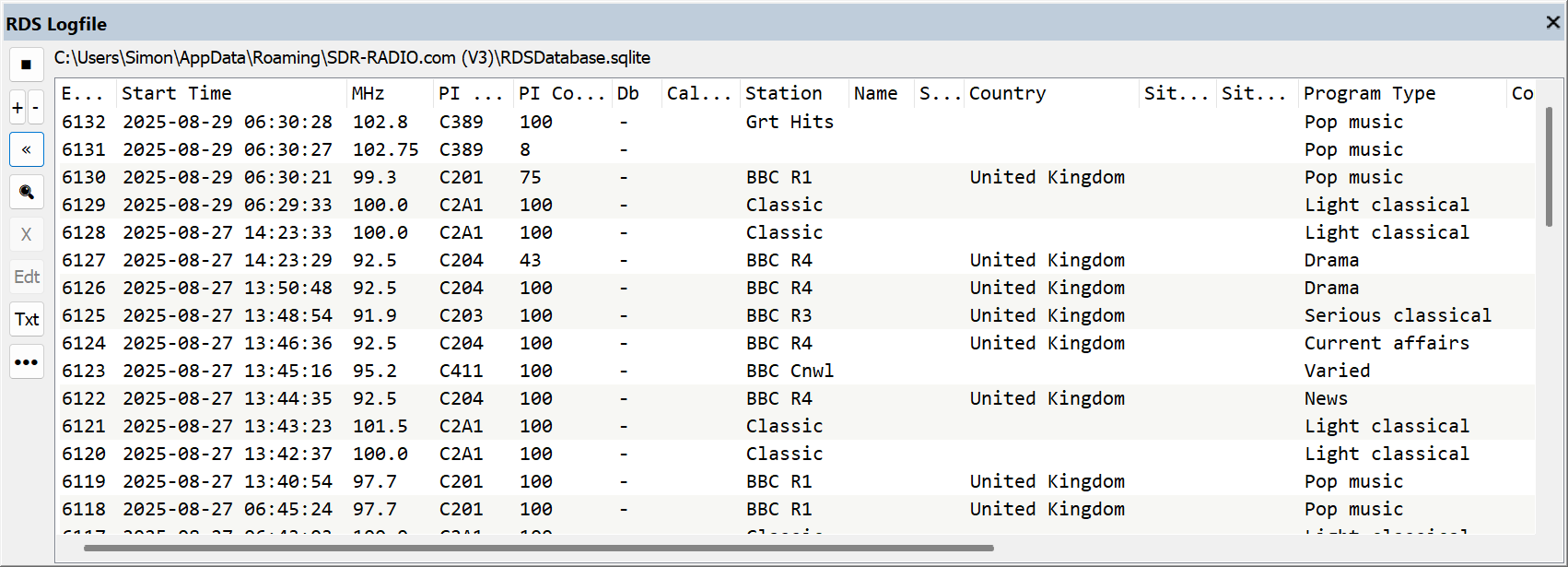
- RDS Logfile window now shows Entry when displaying all fields, see image below.
- RDS Logfile window now supports data sorting by clicking on the column headers.
Radio Data System(RDS) is a communications protocol standard for embedding small amounts of digital information in conventional FM radio broadcasts. RDS standardizes several types of information transmitted, including time, station identification and program information.
August 28th, 2025
- SSB / AM squelch was missing the start and cutting off too soon. Also, the Raised cosine rise/fall was missing. Now, the SSB/AM squelch is more pleasant to listen to. Note: SSB / AM squelch uses voice activity detection, it is not rf-based.
- RDS Logfile display no longer auto-updates if any of:
- Edit window is visible,
- Mouse has been active in the previous five seconds,
- First entry is not visible.
August 23rd, 2025
- Supports Winradio IQ files > 4 GB. These files, like ELAD's do not honour the WAV format correctly, but hey-ho.
- When searching for Airspy HF+ / Discovery / ... SDRs the firmware is now shown in the Options field in the list of SDRs. Also shown in the logfile when connecting to the Airspy.
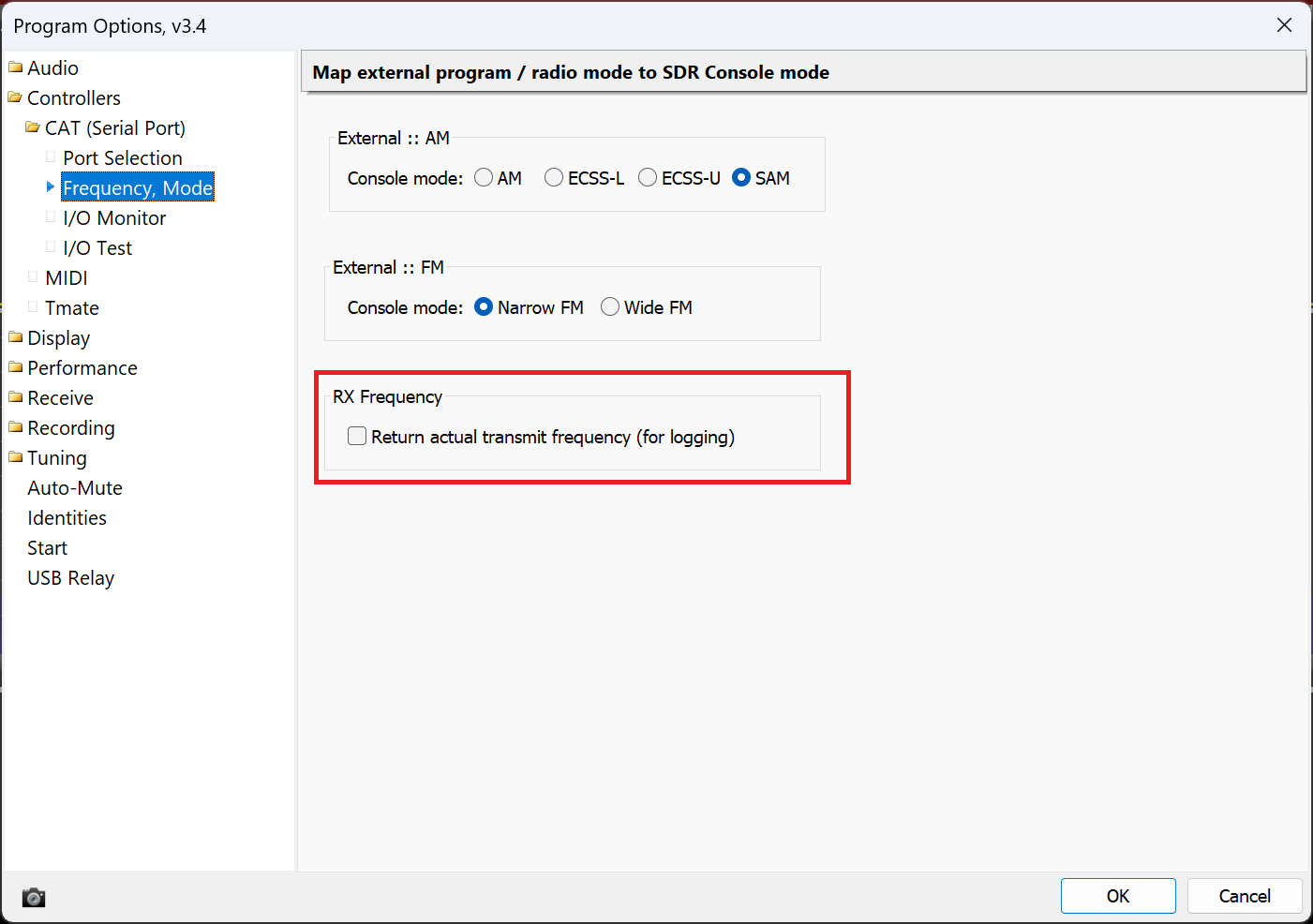
- Option added to support logging programs when using a transmit up/ down converter definition, as we do with the Pluto on QO-100, see image below.
- Previously FA, FB, ... returned the receive frequency (10 GHz) but on QO-100 we're actually transmitting at 2.4 GHz on the up-link.
- When enabled, the actual transmit frequency (2.4 GHz) is returned.
Mode Mapping page is now Frequency, Mode.
June 28th, 2025
- Scheduled recordings now have an option to shut down the computer when the recording is finished.
- Streaming now compresses the data when the bandwidth is 5MHz or greater.
June 26th, 2025
- Preset recording definitions now include the action to take when the recording finishes, see image below.
- The Stop button in Ribbon bar, Home, Radio now stops the recording playback.
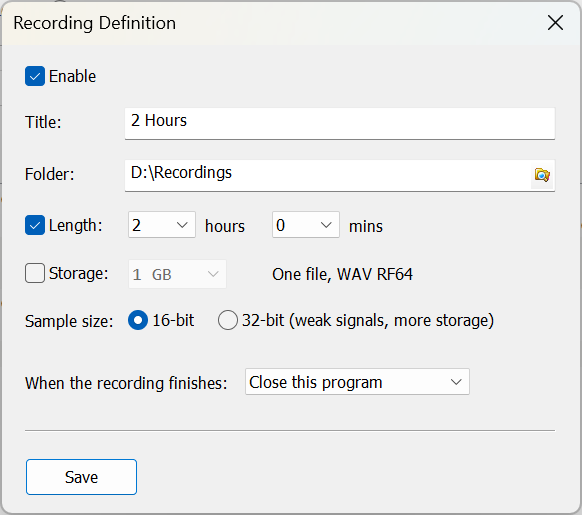
June 25th, 2025
- Left and Right channels in Broadcast-FM swapped over, was reported that they were previously wrong. Please check!
June 22nd, 2025
- Custom layouts now restore the collapsed / expanded state of the Receive and Transmit panes.
June 20th, 2025
- When the Microphone dropdown is opened in the Transmit panel the list of capture devices is re-enumerated and updated, so anything you plug in / out is reflected in the dropdown list without having to restart. Unplugging the microphone you are using is not supported, but you don't do that, right?
- The TX relay can now be connected after starting, it will be opened when the next transmission is made.
June 19th, 2025
- Reworked some MIDI support to reduce / eliminate crashes.
June 18th, 2025
- Pluto updated for wideband transmit - SDR Television
- Fixed SPECTRAN V6 support
- NR3 (rrnoise) updated to version 0.2 Release RNNoise 0.2 · xiph/rnnoise.

Kits
The beta kits are here: https://www.sdr-radio.com/download#Beta

SDR Television v1.1.7 October 26th, 2026, Important bug fix and enhanced user interface. I've been using ChatGPT to help with both DSP and user interface design. Here we see the result of interface design. Receiver Finally found the cause of a bad memory leak. Every time User Interface Added an Octave Spectrum display, this is selected on the Receive and Transmit displays from the main dropdown, sub-menu "Audio Display..." as shown below. Added a new Style, SDR Television - Modern. Select the style from the Style dropdown in the top right-hand corner of the main display. Downloads are at the bottom of this page.

Introduction During September and October 2026 new noise blankers have been implemented to improve what was a weak part of the SDR Console signal processing chain. Using the knowledge of ChatGPT, this exercise took only five days and the result is shown below. These noise blankers will be available sometime in October 2026. Impulse Noise A noise blanker should remove Impulsive interference such as electrical switching noise, electric-fence pulses, ignition interference and short static crashes The screenshot below shows the new wideband noise blanker in action. The top half of the main waterfall shows the noise created by an electric fence, The bottom half shows the noise removed by the new wideband noise blanker.

RadioClear AI – A New Approach to Speech Noise Reduction Improving Weak Signal Reception One of the biggest challenges when listening to weak radio signals is separating speech from background noise. As signals become weaker, the noise can overwhelm the speech, making conversations difficult or sometimes impossible to understand. Conventional noise reduction has been available in software-defined radios for many years. Most systems analyse the received audio, estimate which frequencies contain noise, and reduce their amplitude. This can work very well, but there is always a compromise. Too little suppression leaves distracting background noise, while too much can make speech sound metallic, watery or unnatural. Important speech information may disappear along with the noise. For some time, I have wanted to develop a better approach for SDR Console, particularly for weak SSB reception. The objective was not simply to produce quieter audio, but to improve intelligibility while preserving the natural characteristics of the speaker's voice. The result is RadioClear AI , a new noise-reduction system combining adaptive digital signal processing with a recurrent neural network and complex temporal filtering. Comparison With RNNoise RadioClear AI and RNNoise both use neural networks to improve speech intelligibility by reducing unwanted background noise, but they employ different approaches. RNNoise is a well-established, computationally efficient solution that combines traditional signal processing with recurrent neural networks to estimate frequency-dependent suppression gains. It performs well across a variety of speech applications and has the advantage of being lightweight and widely tested. RadioClear AI has been developed specifically with radio communications in mind, particularly weak SSB signals affected by receiver noise. It combines adaptive noise estimation and speech-aware spectral processing with a recurrent neural network that generates complex temporal filter coefficients. Unlike conventional gain-based suppression, this approach uses information from consecutive audio frames to adjust both the amplitude and phase of the enhanced signal. Both approaches have strengths, and their relative performance depends on the type of interference, signal conditions and training material. RNNoise benefits from its maturity, efficiency and general-purpose design, while RadioClear offers a more specialised processing architecture tailored to weak radio reception. In initial listening tests, RadioClear AI has produced encouraging results, with cleaner background noise and natural-sounding speech compared with RNNoise on the signals tested. However, these observations are subjective, and controlled comparisons across a wider range of recordings would be needed to establish a consistent performance advantage. Further improvements to RadioClear's training data are planned, particularly using cleaner speech recordings and a greater variety of speakers and receiver noise conditions. Combining Traditional DSP with Artificial Intelligence Rather than relying entirely on artificial intelligence, RadioClear AI uses two complementary processing stages. The first stage is based on conventional digital signal processing. It continuously estimates the background noise and analyses the incoming audio to identify frequencies likely to contain speech. It also examines harmonic relationships, which are particularly important for voiced speech. This information is used by an adaptive spectral suppressor to reduce background noise while protecting important speech components. The result is an initial noise-reduced signal that provides a stable foundation for the neural network. This arrangement has an important advantage. The neural network does not need to learn everything about noise estimation and suppression from scratch. Instead, it receives a partially cleaned signal together with detailed information about the speech and noise characteristics. The neural network can then concentrate on improving the result. Looking Beyond Individual Audio Frames One of the limitations of conventional spectral noise reduction is that it generally operates by adjusting the amplitude of individual frequency components. However, speech is not a collection of unrelated frequencies. It is a continuously evolving signal with strong relationships between consecutive moments in time. RadioClear AI takes advantage of this. The incoming audio is divided into overlapping frames, and each frame is converted into a frequency-domain representation using a Fast Fourier Transform (FFT). The neural network receives 400 features describing the signal across 40 frequency bands. These include information about signal power, estimated noise, signal-to-noise ratio, speech probability, harmonic content and the relationships between consecutive complex spectra. At the heart of the system are two Gated Recurrent Unit (GRU) layers. Unlike a simple feed-forward neural network, a GRU maintains information about previous frames, allowing the system to recognise how speech changes over time. This temporal information is particularly valuable when the speech is partially obscured by noise. Complex Temporal Filtering The most significant difference between RadioClear AI and a conventional neural noise reducer is the way the network processes the audio. Many neural noise-reduction systems generate a set of gains that are applied to individual frequency bins. Although effective, this approach primarily controls amplitude. RadioClear AI goes further by generating complex-valued filter coefficients . For each frequency bin, the system combines information from the current audio frame and the previous two frames. The neural network determines how these spectra should be combined to produce the enhanced signal. Because the coefficients are complex, the system can modify both amplitude and phase. It can also exploit the relationships between consecutive frames rather than treating each frame independently. This gives the network considerably more flexibility than a conventional spectral gain mask. The neural network produces coefficients for 40 frequency bands, which are interpolated across the 257 FFT frequency bins. A three-tap complex temporal filter then generates the enhanced spectrum, which is converted back into audio. The complete process operates continuously in real time. Training the Neural Network The neural network is trained offline using examples of speech mixed with receiver noise. During training, the system is provided with both the noisy signal and the corresponding clean speech. It learns to generate complex filter coefficients that make the processed spectrum resemble the clean reference as closely as possible. An important development decision was to train the network against the actual reconstructed complex spectrum , rather than simply asking it to reproduce a set of ideal filter coefficients. This means the training process directly rewards improvements in the enhanced signal. The current network contains approximately 568,000 parameters and was trained using speech mixed with real receiver noise at signal-to-noise ratios ranging from +15 dB to −10 dB. The training and evaluation process showed substantial reductions in complex spectral error compared with the initial deterministic noise-reduction stage. The improvements were particularly encouraging at the lowest signal-to-noise ratios, where additional noise reduction is most valuable. Of course, mathematical measurements are only part of the story. A lower spectral error does not automatically guarantee better-sounding speech, so listening tests remain essential. Real-Time Processing and Listening Results The neural network was originally developed and trained using Python and PyTorch. The complete inference engine was then implemented in C++ for integration into SDR Console. To ensure that the C++ implementation behaved correctly, its results were compared directly with the Python reference. This included the recurrent network, complex coefficient generation, frequency interpolation and final spectral filtering. The results agreed to floating-point precision, giving confidence that the real-time implementation reproduces the trained model accurately. Initial listening tests have been very encouraging. On weak SSB signals, RadioClear AI produces natural-sounding speech with substantial background-noise reduction. In my own listening comparisons, the results have been noticeably better than RNNoise, particularly in preserving speech quality while reducing unwanted noise. An additional aggressiveness control has also proved useful, allowing stronger suppression of residual noise where desired. As always, the best setting depends on the received signal. Maximum noise reduction is not necessarily the same as maximum intelligibility, so the listener retains control over the amount of processing applied. What Comes Next? Although the current results are very promising, development is far from finished. One area where I expect further improvements is the training material. The first model was trained using a relatively small amount of speech, and the supposedly clean reference recording contained a little background noise. This is not ideal. If noise is present in the clean training reference, the network can learn to preserve some of that noise because it is treated as part of the wanted signal. The next step will therefore be to create a much better training dataset using genuinely clean speech recordings, ideally from several different speakers, together with a wider variety of real receiver noise. I intend to retain the existing neural architecture initially so that improvements from better training data can be evaluated independently. There is also potential to extend the system to other receiving modes, including AM and music, while retaining the existing 8 kHz neural processing engine. Final Thoughts RadioClear AI represents a significant step forward in my work on speech noise reduction for SDR Console. The most interesting aspect is not simply that it uses artificial intelligence, but how conventional DSP, recurrent neural processing and complex temporal filtering work together . By combining an adaptive noise estimator, speech-aware spectral processing and a neural network capable of exploiting relationships between consecutive audio frames, the system can perform noise reduction that would be difficult to achieve using conventional spectral attenuation alone. The aim has always been straightforward: make weak radio signals easier and more pleasant to listen to, without destroying the speech we are trying to recover. The initial results suggest that this approach has considerable potential, and I look forward to seeing how much further it can be improved with better training recordings. RadioClear AI is still evolving, but it is already producing some of the best weak-signal speech noise reduction I have achieved in SDR Console.

Can We Build a Better SSB Demodulator?

The Future of SDR Software

History

SDR Television v1.1.6 September 14th, 2026. To avoid confusion with the test versions of 1.1.5, this kit is now 1.1.6. Receiver Improved Gardner timing recovery. Improved Sum-product decoding. Redesigned soft decoder. Redesigned RRC matched filter. Note: this kit should be able to gain a dB or so sensitivity when detecting the frame header. v1.1.6 will have even better frame detection, hence better weak signal decoding. LDPS Settings, important! Open this page, select Defaults . There is no need to adjust the Sum-product optons, these options are only for development and may be hidden in future kits. Transmit Provider changed from SDR Television to SDR TV, some receivers only display a maximum of 18 characters in the provider field. Downloads are at the bottom of this page.

Improving DVB-S2 PLHEADER Detection at Low SNR Reliable detection of the DVB-S2 Physical Layer Header (PLHEADER) is one of the first challenges faced by a DVB-S2 receiver. Before the receiver can decode the payload, it must determine where a physical-layer frame begins, establish carrier phase and frequency sufficiently accurately, and decode the signalling contained in the PLS code. This becomes particularly interesting at very low SNR. I have been comparing two approaches: A traditional differential SOF/PLS detector. A new coherent, maximum-likelihood-oriented PLHEADER detector designed to exploit substantially more of the information contained in the DVB-S2 header. Both methods are trying to answer essentially the same question: At what symbol does the DVB-S2 PLHEADER begin, and what carrier frequency and phase best explain the received 90-symbol header? The difference is how much of the available information they use to answer that question. The full PDF is here .

Project for 2027? Love it or hate it, FT-8 is here to stay. I use WSJT-X to monitor 2m and sometimes 70cms. As a software developer, it's always rewarding to use one's own software. So I just asked ChatGPT whether it (he, she, they) even knew about FT-8. The response was amazing. So, this could be the start of a project which is also used for EME and meteor scatter modes. Read on dear reader, read on.