SDR Television Beta #2

Simon Brown • April 24, 2025

The first Major Update

First of all, a big thank-you to everyone who has been trying the software, for the feedback and the help finding a very stupid bug which caused the "Encountered an improper argument" error.


Don't worry - if you use QO-100 then I'll be watching you!


At the bottom of this blog entry are new kits for both SDR Radio and SDR Television, but first here's what's been happening.


SDR Radio

Attacked two problems,

  1. Selecting Pluto/LibreSDR connected to the network,
  2. Slow startup when selecting Pluto/LibreSDR connected via USB.


Network Connection

This was a bug I introduced when adding custom LibreSDR support. I do hope it's fixed, if you have a problem please show me the Address field in your Radio definitions.


Slow Startup

It's always good to revisit code with a fresh brain - sometimes design errors jump out and smack you between the eyes. When starting a USB device I was searching in all backends (network, usb, ...) for the device when I knew already that it was a USB device. Now I just look for the device I want to open in the USB devices, this has significantly reduced the startup!


TX Filter Width

Now disabled while transmitting.


TX Offset.

The default TX offset is ignored in wideband (DATV) mode, this was causing stations to be 25kHz off frequency.


Bad Waveform

I'll be working on a problem when running the Pluto/LibreSDR with a bandwidth < 1,000 kHz where the signal appears to have a small crown! Recommended bandwidth is 1,536 kHz or higher.


SDR Television

If you select Transmit > Send a check is made to ensure you have entered your Callsign and Name in the TX: Configuration panel in the program settings (see below). If you haven't then you are prompted to do so.


NVIDIA Broadcast App

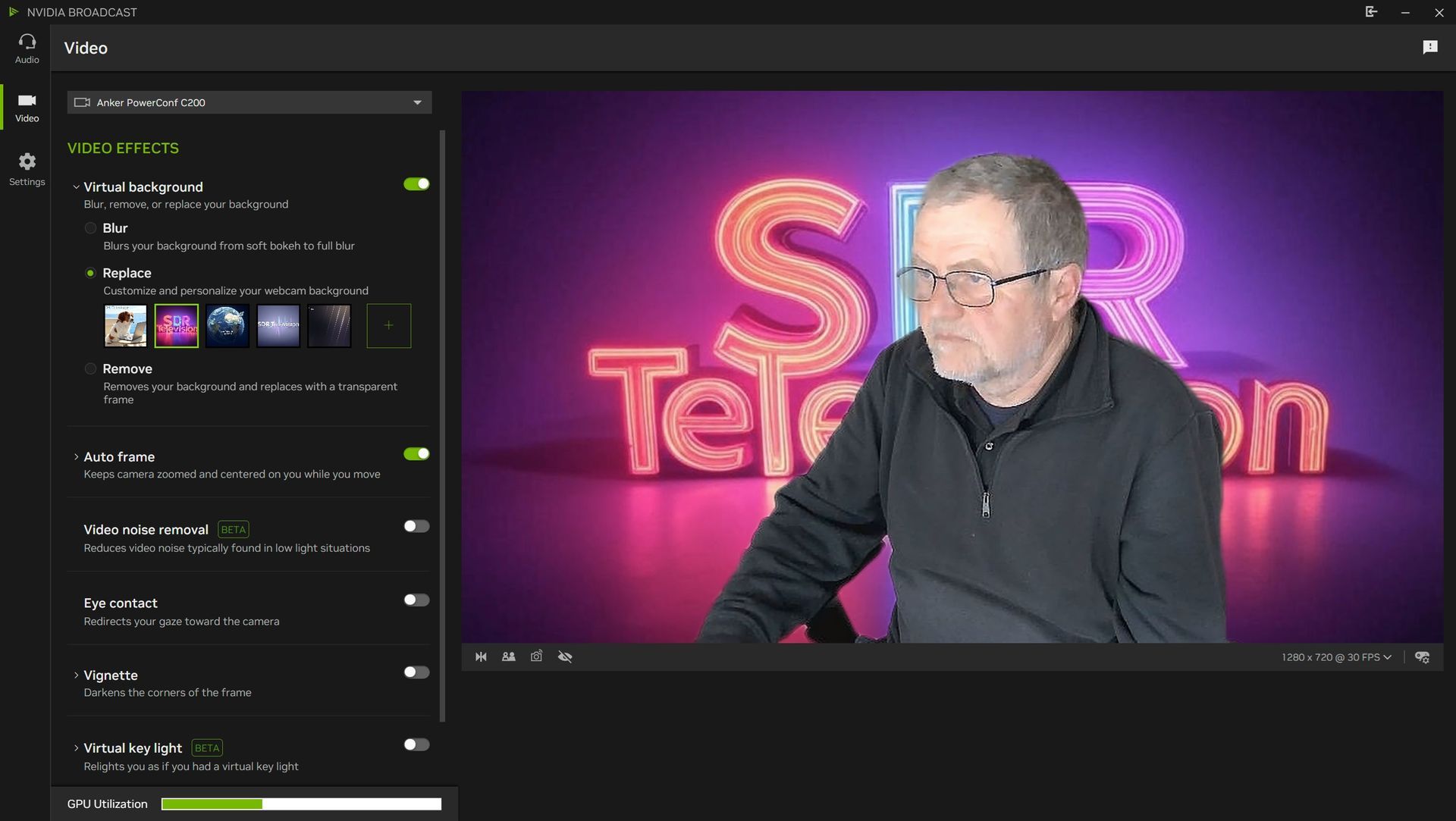
I also stumbled across NVIDIA Broadcast App which "transforms any room into a home studio". To use this you'll need a modern RTX GPU from NVIDIA. More information on this page. It's worth trying, has some good audio features.
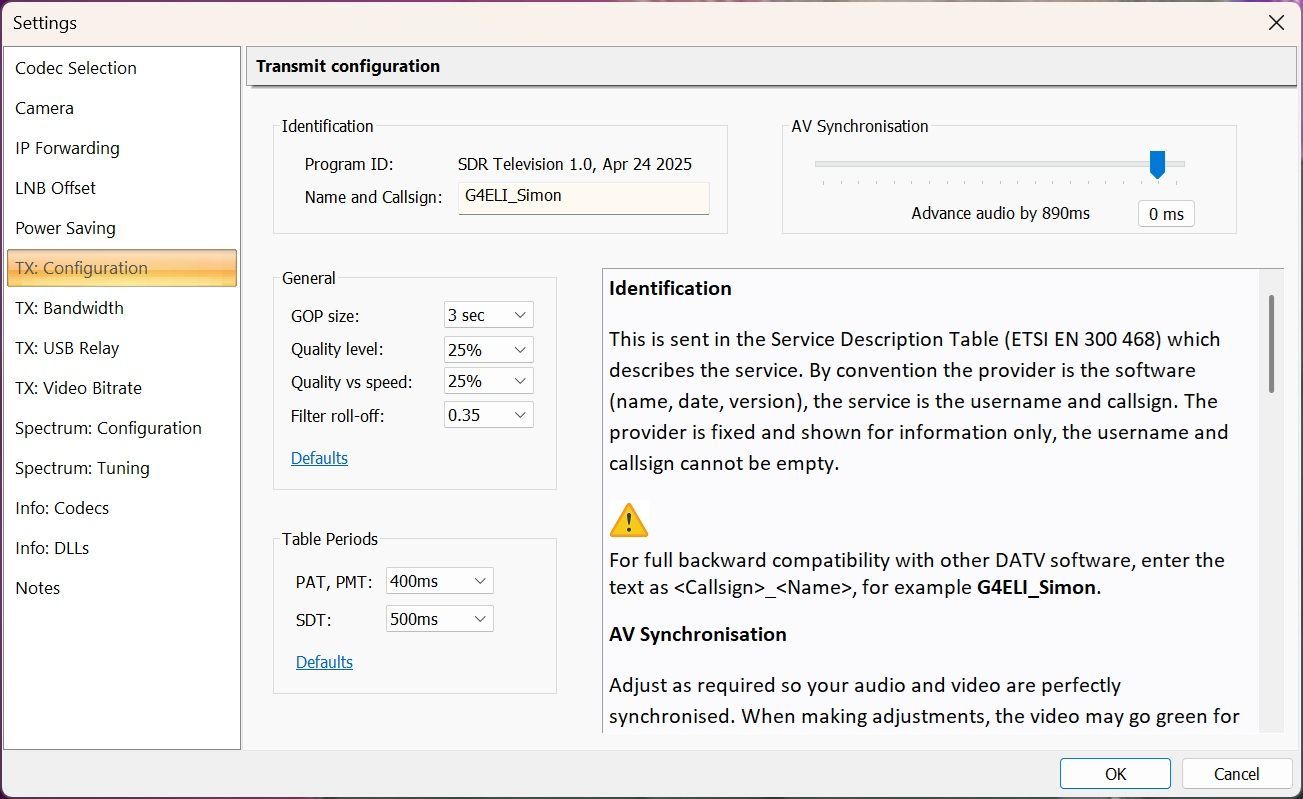
NVIDIA Broadcast App

NVIDIA Broadcast is a free application designed to enhance the quality of livestreams, video calls, and voice chats by using artificial intelligence (AI) to upgrade standard webcams and microphones into smart, premium devices. It leverages the dedicated Tensor Core AI processors found on NVIDIA GeForce RTX, TITAN RTX, or Quadro RTX GPUs to provide real-time AI-powered effects[1][2][5][8].


Key Features

  • Noise Removal: Removes unwanted background noise from your microphone feed, such as keyboard clicks, pets, or street noise. This feature can also clean up incoming audio from others[1][5][8].
  • Virtual Background: Allows you to remove or replace your webcam background with images, gameplay footage, or a blur effect, similar to a green screen, without needing special equipment[1][5][6][8].
  • Auto Frame: Uses AI to track your face and keep you centered in the camera frame, even as you move around[1][5][6][8].
  • Video Noise Removal: Reduces visual noise and graininess from your webcam feed, especially helpful in low-light conditions, making the video appear clearer and more professional[5][6].
  • Room Echo Removal: Filters out echo from your microphone, improving clarity during calls and recordings[6].
  • Virtual Key Light and Studio Voice (Beta): Additional features in development to further enhance video and audio quality[5].


Compatibility and Use Cases

  • Works with most popular livestreaming, video conferencing, and voice chat apps, including OBS, Discord, Zoom, and more[1][2][5].
  • Requires a compatible NVIDIA RTX GPU for full functionality, as the AI effects rely on Tensor Cores[1][5][8].
  • Can be used for game streaming, professional video calls, online teaching, content creation, or simply improving everyday communication quality[2][3][7].


How It Works

NVIDIA Broadcast processes your audio and video feeds in real-time, applying AI effects to clean up noise, improve image quality, and add professional touches—all without the need for expensive hardware or a dedicated studio setup[1][2][5][8].


In summary, NVIDIA Broadcast is a powerful, AI-driven tool that transforms any room into a home studio, making high-quality streaming and communication accessible to anyone with a compatible NVIDIA RTX GPU[2][5][8].


Citations:

[1] https://www.nvidia.com/en-gb/geforce/news/gfecnt/202009/nvidia-broadcast-app/

[2] https://www.nvidia.com/en-gb/geforce/broadcasting/broadcast-app/

[3] https://www.nvidia.com/en-gb/design-visualization/software/broadcast-app/

[4] https://www.youtube.com/watch?v=gTbb_giw4lc

[5] https://www.nvidia.com/en-gb/geforce/broadcasting/broadcast-app/faq/

[6] https://www.youtube.com/watch?v=_kHFTeL1RVU

[7] https://www.nvidia.com/en-gb/geforce/broadcasting/broadcast-sdk/resources/

[8] https://www.windowscentral.com/what-nvidia-broadcast


---

Description created (because I'm lazy today) by Perplexity: https://www.perplexity.ai/
The Kits

So, finally here are the kits:


SDR Radio:

SDR Television:


Any problems - just shout!
By Simon Brown June 12, 2026
SDR Television v1.1.2 June 12th, 2026: Add option to disable audio, thus making more bits available for video, this is for use in DATV contests. Note: 66 ksps sample rate is still experimental, will be improved. Downloads are at the bottom of this page. 
By Simon Brown June 9, 2026
SDR Television v1.1.1 June 9th, 2026: Fixes a fatal bug in the Settings, Camera page. Downloads are at the bottom of this page.
By Simon Brown May 23, 2026
Version 1.6.2 This release fixes two bugs in the new DX Spot feature. The spot age logic incorrectly affected spot display. When the map was zoomed, station markers off the map would be displayed at the top left (0, 0).  Downloads are on the World Map page . Version 1.6.1 This release fixes two fatal bugs in the new DX Spot feature. When the graphics engine is restarted, resources are correctly released. Fixed a resource leak when processing the MoseMove logic. Downloads are on the World Map page . Version 1.6 This release adds the display of DX Spots. Display spots are submitted to PSK Reporter which in turn are relayed by a MQTT Broker running on a high performance Akamia node. Spot Format Each spot consists of these fields: Sequence Frequency Band Mode Signal level Time stamp Sending station call, square, country Receiving station call, square, country Note: The country is the ADIF country. Spots are displayed as they arrive, currently no on-demand database. Bandwidth To reduce bandwidth from the broker, filtering is required for 80m up to and including 15m. Filtering requires at least one field below to be set in a definition: Receiver callsign, square or country. Sender callsign, square or country. Without filtering the bandwith from the broker could be excessive. For LF and VHF+ no filtering is required due to the lower number of spots sent on these bands. In a later version the bandwidth restriction may be reduced.
By Simon Brown May 21, 2026
Version 1.6.1 This release fixes two fatal bugs in the new DX Spot feature. When the graphics engine is restarted, resources are correctly released. Fixed a resource leak when processing the MoseMove logic.  Downloads are on the World Map page . Version 1.6 This release adds the display of DX Spots. Display spots are submitted to PSK Reporter which in turn are relayed by a MQTT Broker running on a high performance Akamia node. Spot Format Each spot consists of these fields: Sequence Frequency Band Mode Signal level Time stamp Sending station call, square, country Receiving station call, square, country Note: The country is the ADIF country. Spots are displayed as they arrive, currently no on-demand database. Bandwidth To reduce bandwidth from the broker, filtering is required for 80m up to and including 15m. Filtering requires at least one field below to be set in a definition: Receiver callsign, square or country. Sender callsign, square or country. Without filtering the bandwith from the broker could be excessive. For LF and VHF+ no filtering is required due to the lower number of spots sent on these bands. In a later version the bandwidth restriction may be reduced.
By Simon Brown May 20, 2026
Version 1.6 This release adds the display of DX Spots. Display spots are submitted to PSK Reporter which in turn are relayed by a MQTT Broker running on a high performance Akamia node. Spot Format Each spot consists of these fields: Sequence Frequency Band Mode Signal level Time stamp Sending station call, square, country Receiving station call, square, country Note: The country is the ADIF country. Spots are displayed as they arrive, currently no on-demand database. Bandwidth To reduce bandwidth from the broker, filtering is required for 80m up to and including 15m. Filtering requires at least one field below to be set in a definition: Receiver callsign, square or country. Sender callsign, square or country. Without filtering the bandwith from the broker could be excessive. For LF and VHF+ no filtering is required due to the lower number of spots sent on these bands. In a later version the bandwidth restriction may be reduced.
By Simon Brown May 19, 2026
SDR Television v1.1 May 18th, 2026: This is the official v1.1 release , code exactly the same as 1.0.16 which has survived testing for a few weeks. Lots of improvements since the last official kit. As with any software project, there's always room for improvements and new features, but for now here's a stable solution which works well with the QO-100 satellite. Many thanks to Sigi and the DATV test team. Downloads are at the bottom of this page.
By Simon Brown April 12, 2026
SDR Television v1.0.14 April 12th, 2026: A new kit, lots of improvements since the last official kit. As with any software project, there's always room for improvements and new features, but for now here's a stable solution which works well with the QO-100 satellite. Many thanks to Sigi and the DATV test team. Downloads are at the bottom of this page.
By Simon Brown March 13, 2026
SDR Television v1.0.9 March 13th, 2026: A new kit, lots of receive improvements since the last official kit. As with any software project, there's always room for improvements and new features, but for now here's a stable solution which works well with the QO-100 satellite. Many thanks to the DATV test team. Downloads are at the bottom of this page.
By Simon Brown March 11, 2026
First Impressions